

Photographing Holiday Lights with your Smartphone
Capturing the Glow
Holiday lights are pure magic — twinkly, cozy, and nostalgic. Whether you’re admiring the lights on your tree, strolling through a neighborhood display, or snapping photos at a festive event, those glowing scenes make fantastic scrapbook material.
Here are a few Scraptivist-approved tips for photographing holiday lights with your smartphone — both indoors and out — so your December pages absolutely shimmer.


Indoor Holiday Light Photos
When the winter chill settles in and the world outside turns frosty, so much of the holiday magic happens right at home. The twinkle of your tree, the soft glow of candles, the sparkle of garlands, ornaments, and window lights — these cozy little scenes are the heart of so many December stories. Enjoy these tips to help you capture warm, intimate photos that will add a glow to your holiday pages.
Turn Off the Overhead Lights

Aim for a cozy vibe! Switch off bright lights and let the tree or menorah be the star of the show. Soft ambient light (like a lamp in the corner or candles) helps keep faces visible without washing out the sparkle. However, in low-light settings, you will need a steady hand. Use a tripod if you have one, but if you don’t, here are a few tips:
- Rest your elbows on a table or the back of a chair
- Lean against a wall
- Set the phone on a stack of books and use the timer
Your pages will thank you for those crisp in-focus photos.
Want to learn more? Check out this article: Mastering Smartphone Photography at Night. For iPhone-specific tips, check out this article OR this article for Android-specific tips.
Get Close to the Details

Take photos of:
- A single special ornament glowing in the lights
- Wrapped gifts illuminated by the tree
- Your holiday village or mantle garland
- Reflections in a window or shiny ornament
Close-up shots feel intimate and make beautiful accent photos for your layouts. You can also use a series of small (2×2) close ups to create borders.
Use “Portrait Mode” for That Dreamy Blur

Most phones give you that lovely bokeh (background blur) with one tap. It softens the lights, making them look like sparkly bubbles. Perfect for cozy pages and title cards.
Want to learn more about using portrait mode? Check out How to Elevate Your Smartphone Shots with Portrait Mode
Outdoor Holiday Light Photos
Once you bundle up and step outside, the holiday world transforms into something magical. My neighborhood is currently glowing with strings of lights and front yards are bursting with cheerful displays. I can’t help myself. I have to stop, admire, and snap pix of every glowing tree and holiday display.
Outdoor light photos bring a sense of wonder and scale to your scrapbook pages. Make sure to capture the festive sparkle beyond your front door and yard.
Go Out at “Blue Hour”

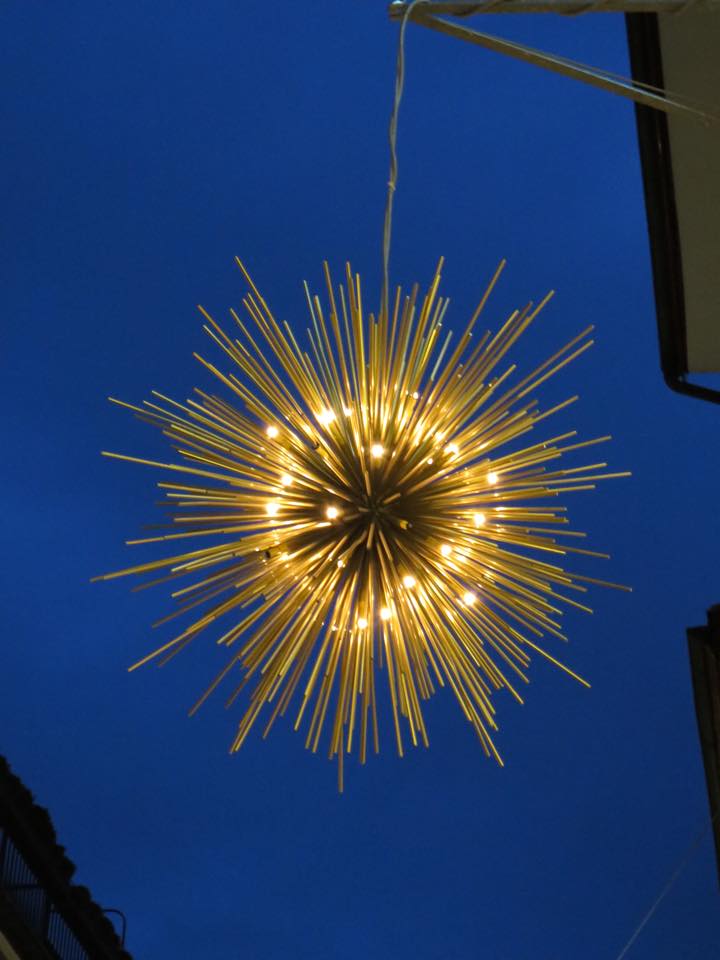

You’ve probably heard about the “golden hour”, often referenced as a great time to take photos. But have you heard about the “blue hour”?
Golden hour is the time shortly AFTER sunrise or BEFORE sunset. During this time, the sun is low on the horizon and the lower rays create soft golden hues. The Blue hour, however, is that dreamy time just AFTER sunset — or BEFORE sunrise — when the sky is filled with cooler, blue hues. During this short period, there is still enough natural light to capture details, but it’s dark enough for lights to glow.
Want to learn more about blue hour photography? Check out this article: The Ultimate Guide to Blue Hour Photography with Your Phone.
Try Different Angles


Get playful! Get down on one knee. Stand on a bench. Walk around your subject, looking for a more interesting angle or try one of these:
- Lay down under a tree wrapped in lights and shoot up
- Try to capture the glow on snow or wet sidewalks
- Look for reflections in puddles or windows
- Make sure to get a variety of wide shots and close shots
A mix of perspectives will make your holiday scrapbook layouts more dynamic.
Adjust Exposure
Lowering exposure slightly deepens colors and keeps bright lights from looking blown out. Try experimenting with different exposures when taking photos of holiday lights. It’s easy to change the exposure on a smart phone. Simply tap on the screen and then slide the little sun icon up or down.
Want to learn more about exposure, check out: Mastering Exposure: A Guide to Changing Exposure on Your Phone Camera

A Few Smart Phone Photography Tips
These quick tips will help you to get those perfect shots for your holiday albums:
- Keep Your Lens Clean: Cold weather + pockets + fingerprints = blurry photos. A quick wipe with a microfiber cloth (or your sleeve if you must) makes a huge difference.
- Turn on Night Mode, but don’t overdo it: Night Mode is amazing but can brighten things too much. If your phone lets you adjust the Night Mode timer, try shortening it to keep the warm glow.
- Lock Focus for Sharper Shots: Press and hold on the spot on your screen where you want to focus in the photo. Keep pressing until the lock symbol appears. This will ensure your photo focuses on your subject. It also helps keep lights sharp in the photo.


Scrapbook-Specific Tips
Think About Your Layout as You Shoot
Make sure you capture a wide variety of pictures to help you with your layouts. Try capturing the following:
✓ A wide “establishing shot” to set the scene
✓ Mid-range photos for context
✓ Close-ups for details and texture
✓ A selfie or family shot to tell the story
✓ A variety of vertical/portrait photos AND horizontal/landscape photos
This will give you many photo options to use. You’ll thank yourself later as you layout out your pages!

Photograph the Imperfect Moments Too
Real-life moments are scrapbooking treasure. So don’t forget to take photos of:
- Half-strung and/or tangled lights
- That burnt batch of holiday cookies
- The gift wrap disaster
- The exhausted crew sleeping in the back seat after a late night of holiday light gazing
- The tree the cat knocked over
It’s OK to Use the Imperfect Photos Too
Even if your photo is not technically perfect, if it’s a part of the story, make sure you include it in your album. An imperfect photo is better than no photo, like this over-exposed photo of my cat, Pierre. He’s no longer with us, and I’m so happy I have photos of him — no matter how imperfect they are!

Crafty Ways to Use Holiday Photos in your Albums
- Create a “Glow Grid” by printing small 2×2 squares of holiday lights and arrange them in a grid layout
- Add a vellum overlay to soften bright photos and give them a dreamy effect
- Use Creative Memories Peek-a-boo Pockets to capture sequence photos and holiday surprise. Use a photo of a gift beautifully wrapped on the outside pocket. Inside the pocket, place a photos of the recipient ripping open the wrapping paper and one showing their delight and surprise when the gift is revealed.
And here is my final tip–Don’t forget to turn your camera on your friends and family and yourself while snapping pix of the holiday decorations! Here’s our gang out enjoying holiday decorations!

Wishing you all the merriest of holidays in 2025 with plenty of fun- and love-filled photos and memories to fill your scrapbooks!


Great tips & reminders!
Thank you! ☺️